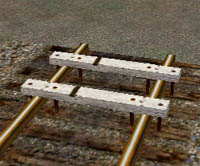
VR Buffer Stops for MSTSModels by James Brook
Credits:
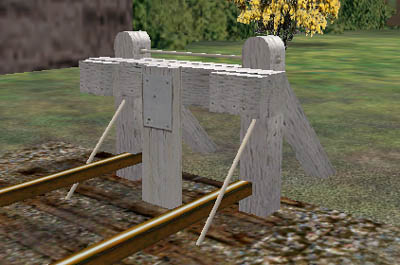
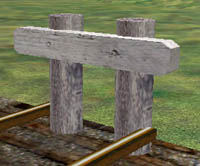
About the prototype:Buffer stops are structures erected at main line terminals and dead-end sidings to offer a reasonable resistance to rolling stock and bring vehicles to rest at the end of the tracks. There are two types of buffer stop; the pile buffer stop and the sill buffer stop. The pile buffer stop is the standard in natural ground and is characterised by two round posts buried as far below ground level as they rise above it. The sill buffer stop is the standard for embankments, soft ground, or rock. It is characterised by two vertical posts that rest on horizontal sole pieces which lie under the track and by tie rods that diagonally connect the posts to the sole pieces. Buffer stops in this download: 1. Pile buffer stop (Au_VR_bstop3.s):
This represents a pile buffer stop built between 1910 and 1924. 2. Early style sill buffer stop (Au_VR_bstop7.s):
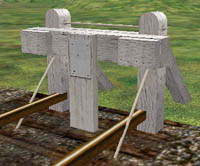
This represents an 1886-1924 standard buffer stop with a buffer beam, buffer blocks (added in the 1930's) and auto-coupler modifications (added in the late 1950's). 3. "New" style sill buffer stop (Au_VR_bstop1.s, ...2.s, ...4.s, ...5.s & ...6.s):
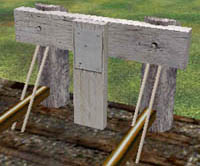
This basic design was introduced in 1924 with a round log buffer beam. In the 1940's the design was changed to a sawn timber beam. A number of variations of this design have been included, both log and sawn buffer beams with and without buffer blocks. 4. VR standard Baulk (Au_VR_baulk.s):
Baulks were used at the end of sidings where car stock was not stabled, were not frequently used and not on a downhill grade. The notch on the top of the baulk were to prevent damage to the handbrake on ZL guards vans. (All prototype information: Arthur Brook) Installation:This add-on uses an installation program. Double click on the executable file and follow the prompts to install the "VR Buffer Stops" to your Train Simulator\ROUTES\Au_AddOns\ directory. When prompted to choose the directory for the installation of the buffer stops, please make sure the path points to the directory where you installed MSTS: <drive>:\<directories>\<msts dir>\
To use these buffer stops in your routes, follow these steps: 1. Copy the contents of the SHAPES directory to the SHAPES directory in the route where you wish to use these models. 2. Copy the contents of the TEXTURES directory to the TEXTURES directory in the route where you wish to use these models. 3. Add the contents of Au_vr_buffer_stops_add_to_ref.txt to the .ref file for the route where you would like to use these models. 4. Open the route editor and find a siding where you would like to use a buffer stop: 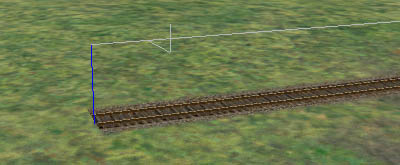 5. Go to Placement->More and locate Au_VR_buffer_stops in the object class menu: 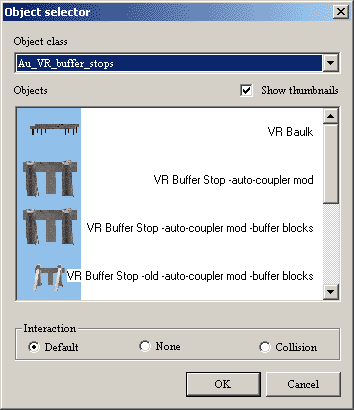 6. Select a buffer stop and with place mode on, line up the centre of the cross with the bottom of the blue line at the end of the track: 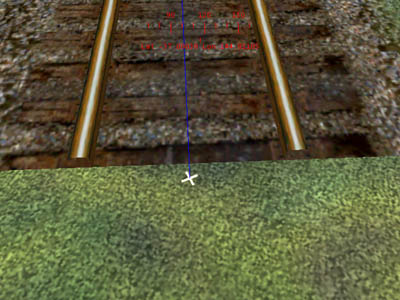 (Note: Please make sure you have View->Track DB Lines turned on) 7. Press the left mouse button to place the buffer stop at the location of the cross: 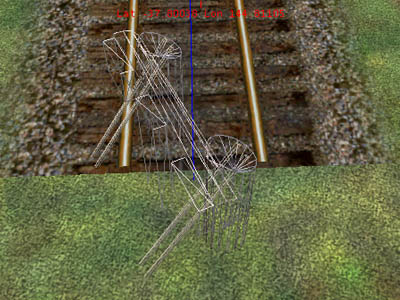 Then rotate the buffer stop so the bars are on either side of the rails and the buffer beam is parallel with the end of the track section.  When you are happy, deselect the buffer stop and move onto the next one! ;) 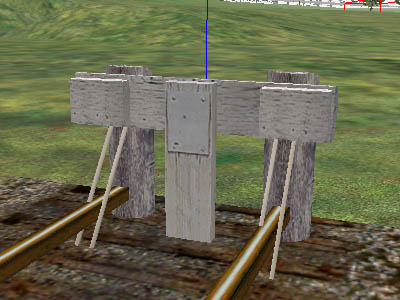 For this method to work properly, you must have the terrain height at the same level as the track. If the terrain is not level with the track then the buffer stop will not appear at the correct height and it may not be centered properly. To raise or lower the terrain to the height of the track, highlight the track section and press Y. Please note: The baulks require an extra step of raising or lowering the height so the bottom of the baulk is resting on the top of the rail. Legal Information:These models are © 2003 James Brook. These models and their textures are free to download and use for personal non-profit use. Any other use of these models and their textures without my permission is strictly forbidden. In addition, these models are not to be re-skinned and re-distributed without my permission. If you would like to re-skin this model, please e-mail me first. Microsoft, Train Simulator and all other names and logos associated with that product remain the property of Microsoft. Any logos used within the textures of this model remain the property of their owner. Train Sim Modeler remain the property of Abacus Software. Disclaimer:This add-on is unofficial and I am not not affiliated in any way with Microsoft. All files associated with this product are provided "as is" and does not come with any sort of warranty whatsoever. I assume that any person using this add-on and its associated files has the necessary knowledge to install and use this software correctly. I am not responsible for any damage and/or loss to you, your data, your equipment or any other property or persons from using (or misusing) this add-on and its associated files. This product is to be USED AT YOUR OWN RISK. By installing this product, you are signalling your agreement to statements contained within this readme file. |